Anyone with the link to a Rikaido quiz can play it and leave a nickname in the ranking. Usually that means your friends, but links get passed around, and now and then a strange or unkind name turns up. This article covers what you can do as the quiz creator, what a player can do about their own entry, and where to get help if it's part of something bigger.
Hide an entry from your ranking
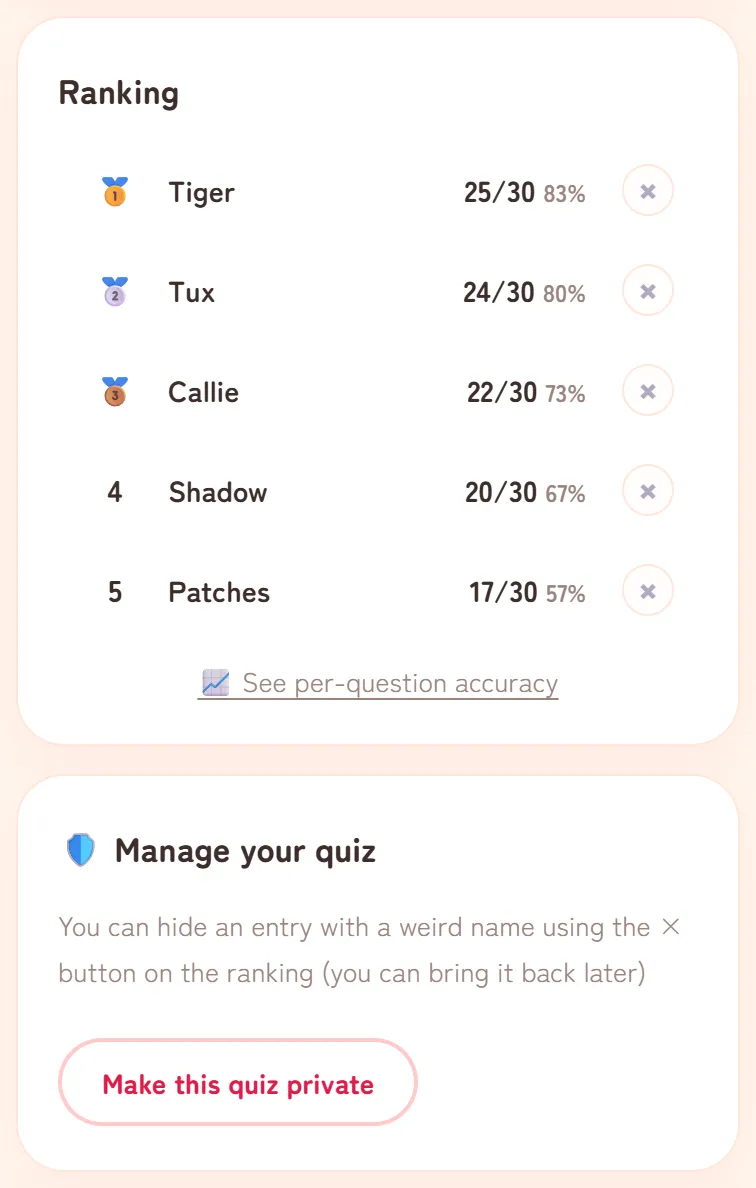
You can hide an entry yourself on your dashboard. Open your quiz link on the device and browser you used to make the quiz. The "🛡️ Manage your quiz" card appears below the ranking.
- In the "Ranking" card, tap the × next to the entry.
- The button changes to "Hide?". Tap it again within a few seconds to confirm. If you don't, it switches back to ×.
- The entry leaves the ranking and is listed under "Hidden entries" in the "🛡️ Manage your quiz" card.
Hid the wrong one? Tap "Undo" next to it under "Hidden entries", and it goes back into the ranking.
If an entry looks like part of bullying or harassment, take a screenshot before you hide it. A record of what was posted, and when, can help if you need to report it later.
Make the whole quiz private
If unwanted entries keep coming, or you just want to stop sharing, tap "Make this quiz private" in the same card. The button changes to "Tap again to make it private"; tap once more to confirm.
Once the quiz is private, anyone who opens the link sees "This quiz isn't available anymore." and can't play. Your dashboard closes too: on the device where you made the quiz, the link shows a screen offering "Make this quiz public again" instead. Tap it whenever you want to reopen the quiz.
What hiding does and doesn't do
- It takes things out of view. A hidden entry no longer appears in the ranking, the averages or the per-question figures. A private quiz can't be opened or played by anyone else.
- It doesn't erase anything. Hidden entries and private quizzes no longer show up on Rikaido, but the data stays stored. That's also why both can be undone.
- It doesn't block anyone. The same person can play again, under the same nickname or a new one.
- It can't reach copies. Screenshots or results that people have already shared aren't affected.
- The count may not go down. The number of people who have played can still include hidden entries.
If you can't use the buttons
Managing a quiz only works in the browser where it was made, because the key that allows these changes is kept in that browser. If you open your dashboard anywhere else, for example after we've sent you a link to bring back a lost quiz, the card says that managing the quiz only works from the device and browser that created it. On some older quizzes, the card says instead that self-service tools are paused.
In either case, contact us by DM on X (@rikaido_me) or through the Contact page. Send the quiz link and tell us what you want hidden: the whole quiz, or one entry (with its nickname and roughly when it was added). We'll check it and hide it for you. If you've lost track of the quiz itself, see Can't see your results?
If it's your entry on someone else's quiz
Players can't edit or remove their own entries. If you want yours gone, for example because you used your real name, you have two options:
- Ask the quiz creator to hide it with the × on their dashboard.
- Contact us by DM on X or through the Contact page with the quiz link, the nickname you used and roughly when you played. We'll check it and hide the entry.
What to keep out of nicknames
Nicknames can be seen by anyone with the link. The one you enter when you make a quiz becomes the quiz title, and the one you enter when you play appears in the ranking.
- Leave out anything that could identify or locate you, such as your full name, your school, your address or your phone number. A nickname your friends recognise is enough.
- Don't enter anything you wouldn't want shown publicly. Our Privacy Policy asks the same.
- Don't use a nickname to insult or harass anyone. The name screen warns that every name is recorded and stored, that insulting or defamatory names may be hidden or deleted, and that they could lead to legal liability.
What Rikaido does on its side
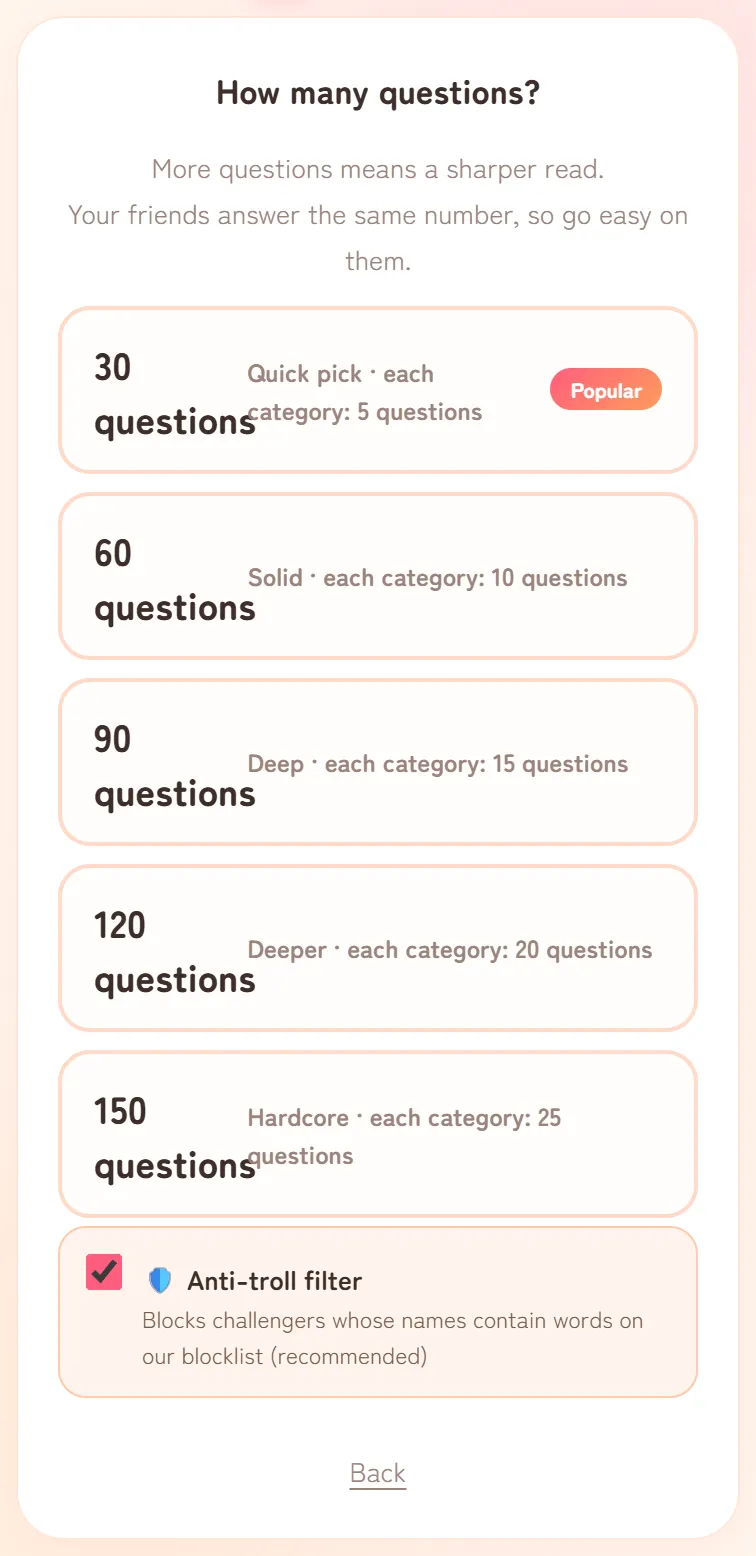
- The Anti-troll filter. On the "How many questions?" screen, the "🛡️ Anti-troll filter" is ticked by default. It stops players from using nicknames that contain words on our list of slurs and explicit terms. No list can catch every word or spelling, so some rude names will still get through. It's set when the quiz is made and can't be turned on later.
- Some words are blocked on every quiz. A shorter list of especially offensive words can't be used on any quiz, with or without the filter. Players who try see "That name can't be used. Please pick another one".
- Mass entries are held back. When a large number of entries arrive with the same nickname, or with identical answers, in a short time, the app leaves them out of the ranking and the player count and flags them for us to review.
None of this catches everything, which is why the × and "Make this quiz private" are there for whatever gets through. Choosing where you share also helps: a link sent straight to friends reaches fewer strangers than one posted publicly.